Alters an object's translation and rotation to create a shaking effect when an event is received.
Suggested use:
Shake the player to indicate anything between pickups-damage, and shake objects to alert the player to their importance. All of the component properties can be altered to create a miniscule wiggle, or a violent shake, for some interesting, experience-enhancing effects.
This is a visual representation of how the Intensity Exponent curve works:
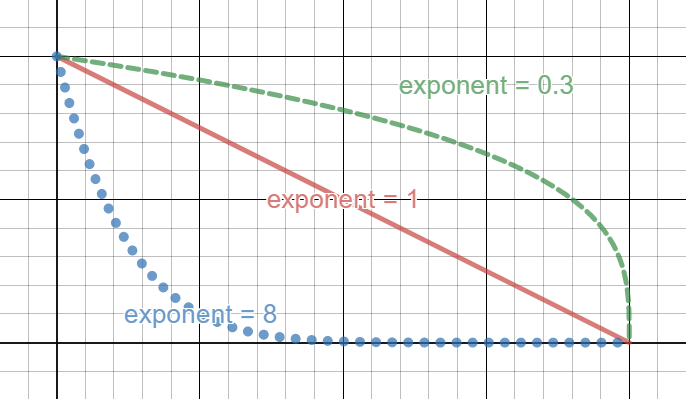
Examples found in: Project 6
| Components | |||
|---|---|---|---|
| Property | Type | Description | Default Value | Component Properties |
| Target Shake Game Object | Transform | Transform component of the game object to shake when the specified event is received. | None |
| Reset Translation | Boolean | Flag to check if the game object shaking will have its translation reset after the effect. | True |
| Reset Rotation | Boolean | Flag to check if the game object shaking will have its rotation reset after the effect. | True |
| Intensity | Float | How much intensity should be added per shake. | 0.25 |
| Intensity Exponent | Float | Set a curve for the shake. High values are larger curves. | 2.0 |
| Translational Magnitude | Vector3 | The maximum distance that the object should displace itself at maximum intensity. | 1,1,0 |
| Rotational Magnitude | type | The maximum Euler angles (in degrees) that the object should rotate itself at maximum intensity. | 0,0,15 |
| Decay Rate | Float | The rate(in intensity amount per second) at which the current shake intensity should decay. | 2 | Event Receiving Info |
| Event Trigger | LPK Event Object | Which event will trigger this component's action. | None | Debug Properties |
| Print Debug Info | Boolean | Toggle console debug messages. | False |
| Label | String | Notes for the user about this component. This does nothing to the game or build. | None |